
Picking a robot RC toy sounds easy until you see how many there are. Most of them look alike in photos. The real difference shows up in what the robot does, how you control it, and how long a kid stays interested. A wrong choice usually means a toy that sits in a drawer after one week. This guide looks at a set of picks from the listings themselves. Every pick below is judged on the same three things: what it’s strong at, what it gives up, and what living with it would ask of you.
1. Hamourd Emo Robot

Best for: A young child getting their first remote-control robot.
This is a small rechargeable robot with a flexible head and arms, LED eyes, and a tank-style track base. Its listing puts most of its weight on easy play. You can switch on a demo mode, and the robot spins and dances on its own. It also sings and talks when powered on, and you can change songs from the remote. The listing says it’s built for kids around age four and up.
Strengths:
- Demo mode runs a full dance with no remote needed
- LED eyes light up, blink, or close from the controller
- Track base lets it move forward, back, left, and right
- Sings different songs, switchable from the remote
- Comes with a Type C charge cable and batteries for the controller
- 2.4GHz controller, so several robots can run together without interference
Trade-offs:
- The listing describes it as suited to ages four and five and up.
- The remote’s batteries are included, but the robot itself charges by cable only
Charge it, switch it on, and let the demo mode run when your child is busy elsewhere. The listing doesn’t mention a run time, so plan your charging around how your child uses it.
| Best for | Why |
|---|---|
| Young beginners | Easy controls and a one-click demo |
| Families with several kids | 2.4GHz remote lets multiple robots run at once |
2. Robot Toys Emo Robot

Best for: A parent who wants the simplest possible setup.
This robot is built around one idea: press a button and it does something. It has LED eyes you can set to blink or stay on, a built-in speaker with several songs, and a pre-programmed dance you start with a single press. It works with a 2.4GHz remote and charges over USB. The listing names children around age three and up.
Strengths:
- One-button dance routine needs no setup
- Eye lights can blink or stay on
- Built-in speaker plays several songs
- Charges from a USB port, including a power bank or computer
- Packed in a colorful box, which suits gift giving
- Comes with a screwdriver and user manual
Trade-offs:
- The remote needs 2 AAA batteries, and those aren’t included
- The listing offers fewer programming options than the more advanced picks below
Charge it, add the two AAA batteries to the remote, and press the button. Nothing else asks for your time. If you want your child to build sequences of moves, this is the wrong pick, but for plain fun it does the job without fuss.
| Best for | Why |
|---|---|
| Busy parents | One button starts the dance |
| Gift buyers | Colorful box and a complete set |
| Younger kids | Simple controls for ages three and up |
3.
Best for: A child who likes to plan and control moves.
This is the most hands-on robot in the group. It has four control methods: a remote, an app, gravity sensing, and infrared gesture sensing. The listing also describes a programming bar with 200 icons, and a remote with a 50-function program button. The app includes a learning section with science content and quizzes. It charges by USB and gives up to 120 minutes of play per charge.
Strengths:
- Four control methods, including app, gravity sensing, and gestures
- 200 editable program icons for building sequences
- Remote’s program button offers 50 functions
- Companion app includes science content and 10-question quizzes
- Up to 120 minutes of play from a 2-hour charge
- Nine dynamic expressions and flexible joints
- Made from non-toxic ABS with smooth edges
Trade-offs:
- Four control options and a large icon set mean a longer learning curve
Owning this robot means spending time together at first. Your child will want to try the app, build a sequence, and test it on the floor. Once they know the icons, they can go on for a long time without help. You’ll mainly need to keep the charge up and the app on a phone or tablet.
| Best for | Why |
|---|---|
| Kids who like building sequences | 200 program icons and a 50-function remote button |
| Learners who like science | App includes science content and quizzes |
| Long play sessions | Up to 120 minutes on one charge |
4. Ruko 1088 Smart Robot Toy

Best for: A child who wants a large robot that looks impressive on the floor.
This robot stands up to 15.8 inches tall. It has ten expressions, nine flexible joints, and ten songs. The listing also mentions gymnastics, storytelling, dance, music, and recording. You can control it with a 2.4GHz remote, a Bluetooth app, or by tilting your phone. It runs on a rechargeable battery and gives up to 100 minutes of play.
Strengths:
- Stands up to 15.8 inches tall
- Ten expressions and nine flexible joints
- Ten songs and a recording function
- Three control methods: remote, Bluetooth app, and gravity sensing
- Up to 100 minutes of play on a full charge
- Skin-safe ABS with burr-free edges
- Listing mentions FCC and CPC certification
Trade-offs:
- The listing says it only charges with the original cable, and USB-C to USB-C cables won’t work
- It needs a 30-minute charge before first use if it doesn’t respond
Living with this robot means keeping the original cable close by. Its size makes it a real presence in a room, so set aside a clear floor space. The listing gives a 90-day warranty and a 30-day return or exchange window, which is useful if the charging cable causes trouble.
| Best for | Why |
|---|---|
| Large-scale fun | Stands up to 15.8 inches tall |
| Kids who like music | Ten songs and a recording function |
| Gift givers | Warranty and return window stated in the listing |
5. Mattel Disney and Pixar WALL-E RC Robot Toy

Best for: A fan of the film who wants the character in toy form.
This is a Disney and Pixar WALL-E robot that stands about 9.5 inches tall. It moves forward and back, turns with a J-turn, and uses a two-button remote. A button on the front sets off one of 20 light and sound combinations. The listing recommends it for kids four and older.
Strengths:
- True-to-movie design
- 20 light and sound combinations from one button
- Moves forward, back, and turns with a two-button remote
- Stands about 9.5 inches (24 cm) tall
- Official Disney and Pixar character with a licensed look
Trade-offs:
- The listing describes a two-button remote that moves the robot forward and back, with a J-turn to change direction.
| Best for | Why |
|---|---|
| Film fans | Faithful WALL-E design and sounds |
| Younger kids | Simple two-button remote |
| Collectors | Official Mattel and Disney Pixar branding |
6. RC Wall Climbing Gecko

Best for: A child who likes odd, lifelike pets and can play on walls.
This is a remote-controlled lizard that climbs walls, glass, floors, and ceilings using air negative pressure. It has glowing blue LED eyes, spins 360 degrees in place, and works with a 33-foot remote range. The listing says it complies with ASTM F963 and CPSIA requirements and suits kids aged three to twelve. It charges by USB.
Strengths:
- Climbs walls, glass, floors, and ceilings
- Switches between wall-climbing and floor modes
- Glowing blue LED eyes visible in the dark
- 360-degree spins in place
- Remote range of up to 33 feet
- Weighs 2.6 ounces and measures 12.8 by 6.5 by 1.6 inches
- Listing cites ASTM F963 and CPSIA compliance
Trade-offs:
- The remote runs on batteries, but you will need to buy them yourself.
- It climbs various smooth surfaces such as walls, glass, floors, and ceilings.
Living with this gecko means testing it on your own smooth surfaces first. Some children will want it on the wall all day, so keep an eye on its charge. It complies with ASTM F963 and CPSIA requirements.
| Best for | Why |
|---|---|
| Wall fans | Climbs walls, glass, and ceilings |
| Night play | Glowing LED eyes |
| Standards-minded buyers | Listing cites ASTM F963 and CPSIA |
7. HEX BOTS Glow-in-the-Dark Wall Crawler Gecko Remote Control Toy
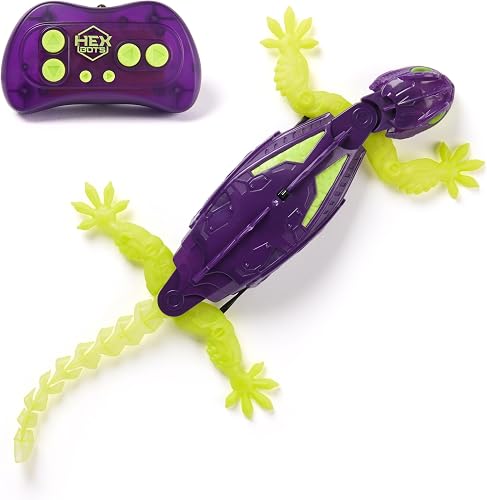
Best for: A child who wants a glow-in-the-dark crawling toy with a simple remote.
This gecko crawls up walls and has LED eyes that glow in the dark. It has a green silicone tail and limbs and a black plastic body. The remote controls it up to 25 feet in every direction. It charges by a USB cable that comes in the box. The listing says it’s a fit for kids and gift giving.
Strengths:
- Crawls up walls
- LED eyes glow in the dark
- Remote control reaches up to 25 feet and moves in all directions
- Green silicone tail and limbs for a realistic look
- USB charging cable is included
- Comes with a remote, charge cable, and instruction guide
Trade-offs:
- The remote runs on batteries, but you will need to buy them yourself.
This one is easy to live with. Charge it, add the remote batteries, and let your child chase it around the house. It’s a playful pick for kids who like a bit of spooky fun. Keep the glowing feature in mind for bedtime play.
| Best for | Why |
|---|---|
| Glow fans | LED eyes visible in the dark |
| Playful kids | Crawls up walls with a simple remote |
| Gift buyers | Charging cable and remote in the box |
8. yiman Remote Control Robot Dog Toy
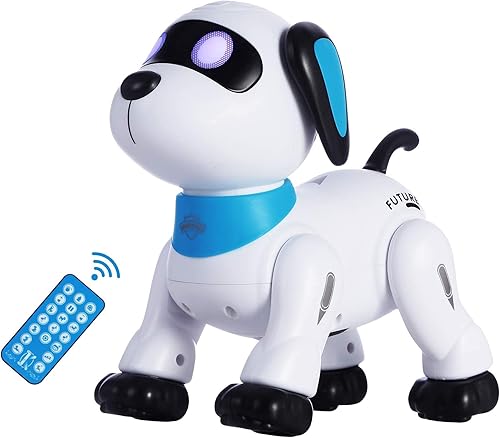
Best for: A child who wants an interactive pet robot that responds to voice.
This is a robot dog you can control two ways: with an infrared remote that reaches up to 33 feet, or with voice commands. Clap twice to start one of three dance songs. The listing also describes programmable commands like sitting, handstands, push-ups, and barking. It has a built-in 3.7V 500mAh battery that runs up to 2 hours after a 2-hour USB charge, and it sleeps after 90 seconds of inactivity.
Strengths:
- Two control methods: infrared remote and voice command
- Clap-twice voice command starts dance modes
- Programmable actions such as sitting, handstands, and push-ups
- Each charge keeps it going for a long stretch of play.
- Auto-sleep after 90 seconds to save power
- Child-safe ABS plastic
- Listing suggests it as an option for children with pet allergies
Trade-offs:
- The listing describes voice control by clapping twice but doesn’t mention how it performs in noisy rooms.
Owning this dog is mostly about the voice and remote play. Your child will clap to wake it up and then give commands. Sleep mode means you don’t need to worry about it draining the battery when left alone, which is a practical plus.
| Best for | Why |
|---|---|
| Voice-command fans | Clap twice to start dance modes |
| Programming beginners | Set custom actions with commands |
| Families with allergies | Listing suggests it as a pet alternative |
9. Ruko R1 Mini Robot Dog

Best for: A child who loves stunts and tricks.
This small robot dog performs stunt flips in four directions: forward, backward, left, and right. It can get back up on its own after a fall. You can control it with a gesture-sensing watch, or with a separate 2.4GHz remote that needs 2 AAA batteries. It weighs 250 grams and measures 6.3 by 4.1 by 3.4 inches. The listing says it gives up to 50 minutes of play after a 2-hour charge.
Strengths:
- Stunt flips in four directions, not just front and back
- Self-righting design gets back up after a fall
- Gesture control through a watch
- Separate 2.4GHz remote included
- Light enough to carry, at 250 grams
- Programmable sequences for stunts, push-ups, and more
- Adjustable volume and a dance and story mode
Trade-offs:
- The remote’s 2 AAA batteries aren’t included
Living with this dog means planning charge time into your day, since its run time is shorter. It’s light and easy to move, so you can take it from the living room to the yard. The self-righting feature is the one thing that will save you from picking it up after every trick.
| Best for | Why |
|---|---|
| Stunt fans | Flips in four directions |
| Portable play | Light at 250 grams |
| Tricks and programming | Sequences for stunts and push-ups |
10. STEMTRON Programmable Robot

Best for: A child who wants to learn programming in a fun, structured way.
This robot is built for learning. It has two control methods: a 2.4GHz remote with over 22 functions, and hand gestures in front of its chest. A programmable mode lets your child create custom action sequences. It also includes nursery rhymes, stories, music, science tales, voice commands, and dance demos. It charges by USB in about one hour and gives up to 60 minutes of play.
Strengths:
- Remote offers over 22 functions
- Gesture control in front of its chest
- Programmable mode for custom sequences
- Five nursery rhymes, two stories, eight music tracks, and four science tales
- Greets with a welcome dance at startup
- Sleeps after 2 minutes of inactivity to save power
- A quick charge in about an hour gives you a full session of play.
Trade-offs:
Owning this robot means building a routine around its learning features. Your child can program sequences, then listen to the stories and science tales. The sleep mode and standby time are handy for busy households. Adult supervision is advised during charging, as the listing notes.
| Best for | Why |
|---|---|
| Learning-focused families | Programmable mode and science tales |
| Gesture fans | Control with hand movements |
| Quick charging | About one hour to charge |
Side by Side
This table lays out the main features from each listing so you can compare them at a glance.
All 10 products side by side — scroll sideways to see every column.
| Top Pick | Best for Simple Setup | Also Great | Best for WALL-E Fans | Best for Walls | Best for Glow-in-the-Dark | Best for Voice Commands | Best for Stunts | Best for STEM Learning | ||
| Preview | | | 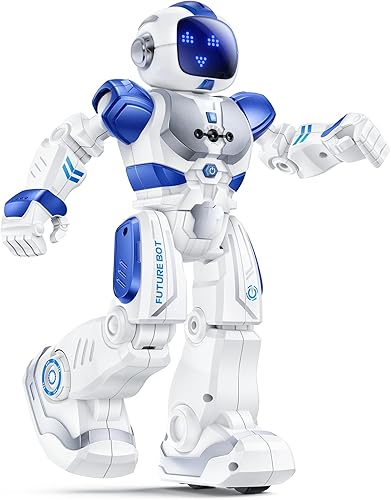 | | | | | | | |
|---|---|---|---|---|---|---|---|---|---|---|
| Product | Hamourd Emo Robot | Robot Toys Emo Robot | Ruko 6088 Programmable Robot | Ruko 1088 Smart Robot | Mattel WALL-E RC Robot | RC Wall Climbing Gecko | HEX BOTS Glow Gecko | yiman Programmable Robot Dog | Ruko R1 Mini Robot Dog | STEMTRON Programmable Robot |
| Brand | Hamourd | Playsheek | Ruko | Ruko | Mattel | Loueouv | HEX BOTS | yiman | Ruko | STEMTRON |
| Best for | Best for Beginners | Best for Simple Setup | Also Great | — | Best for WALL-E Fans | Best for Walls | Best for Glow-in-the-Dark | Best for Voice Commands | Best for Stunts | Best for STEM Learning |
| The listing says | LED eyes light up, blink or turn off Talks on startup and sings songs | LED eyes blink or stay lit Built-in speaker with various songs | Remote, app, gravity and gesture control 200 editable program icons | Stands up to 15.8 inches tall 10 expressions, 9 joints, 10 songs | Remote-controlled WALL-E with lights and sounds About 9.5 inches (24 cm) tall | Crawls walls with glowing blue LED eyes Switches between wall and floor modes | Glow-in-the-dark wall-crawling gecko Remote controls up to 25 ft | Remote control up to 33 ft Voice command: applaud twice for dance | Stands back up after a fall Stunt flips in four directions | 2.4GHz remote with 22+ functions Gesture control from chest sensor |
| More information | Check Price on Amazon | Check Price on Amazon | Check Price on Amazon | Check Price on Amazon | Check Price on Amazon | Check Price on Amazon | Check Price on Amazon | Check Price on Amazon | Check Price on Amazon | Check Price on Amazon |
How to Judge One of These
Control Method Changes How Much a Child Plays
The way you steer a robot shapes how long it holds attention. A simple remote with a few buttons works well for young kids who want quick results. A robot with an app, gravity sensing, or gesture control gives older kids more to explore. The gain is real, but so is the learning curve, and a child who gets frustrated may put the toy aside. Before you order, check how many control methods the listing describes and whether you need a phone or tablet. Ask yourself whether your child will enjoy figuring out the controls or would rather just press a button and watch.
Battery Run Time Decides How Often You Charge
Run time varies a lot across this group. Some listings give up to 120 minutes of play, while others give 50 or 60 minutes. A longer run time means fewer charging breaks, which matters most during long play sessions or when several kids share one robot. Charging method matters too. Some robots charge only with an original cable, and others take any USB port. You can confirm the run time and charging method on the listing before you buy. Check the charge cable that comes in the box, since a missing or incompatible cable can leave the toy unusable until you find a replacement.
Remote Batteries and What Comes in the Box
Many robots in this set need 2 AAA batteries for their remote, and those batteries are often not included. A few listings include them, and that small detail can decide whether the toy works on the day it arrives. Look at the list of what is included before you buy. A set that comes with a charge cable, a remote, batteries, and a manual is ready to play out of the box. A set that leaves out batteries means an extra trip to the store. You can also check whether the listing includes a screwdriver, which helps with battery changes and simple repairs.
Size and Where You Will Play
A robot’s size changes how it fits your home. This model stands about 15.8 inches, while the smallest mini dog weighs only 250 grams. Bigger robots need open floor space and stand out in a room. Smaller ones fit on a desk or table and are easy to carry outside. Think about where your child will play most. If the robot is for a shared living room, a larger model may be fine. If you plan to take it to a yard or a friend’s house, a light, compact pick may be the better choice.
Frequently Asked Questions
Which robot is best for a child just starting out?
The Hamourd Emo Robot and the Robot Toys Emo Robot are the easiest starting points. Both use simple controls, with a dance or demo mode you start with a single button press. The Hamourd robot includes its own charge cable and controller batteries in the box. The Robot Toys robot’s remote runs on batteries you will need to buy yourself. Either one suits a child who wants fun right away.
How long does the first week with one of these robots look like?
Expect to spend the first few days learning the controls and charging the robot. Most listings call for a full charge before first use, and some warn that the robot won’t respond until it’s charged. Once it’s charged and the remote batteries are in, your child can start playing. Planning a short daily charging window helps keep the toy ready.
What will these robots not do?
Most of these robots won’t do real work or handle heavy tasks. They’re toys that move, sing, dance, or perform stunts, and none is designed for outdoor rough terrain. The listings also don’t describe waterproofing, so keep them away from water. Some models won’t respond while charging, and voice control may struggle in noisy rooms. Set expectations around fun and simple learning, not around complex tasks.
Is the simplest pick here enough?
For many families, yes. The Robot Toys Emo Robot offers a one-button dance, LED eyes, a speaker, and USB charging, which covers most of what a young child wants. It lacks deep programming, so kids who want to build sequences or learn coding will feel limited. If your child mainly wants to watch the robot dance and sing, the simple pick is enough.
Closing
If your child is new to remote-control toys, the Hamourd Emo Robot or the Robot Toys Emo Robot keeps things simple, and both come ready to play with little setup. If your child loves programming and planning, the Ruko 6088 or the STEMTRON robot gives them more to build and learn. For a child who wants something unusual, the RC Wall Climbing Gecko offers a fresh way to play on walls and glass. Start by thinking about how your child likes to play, then match that to the control method and run time that fit your home. Check the listing for what is included before you order.


