
Finding the best interactive robot for kids depends entirely on what you want your child to gain from the experience. Some parents prioritize STEM education and coding logic, while others look for a companion that offers emotional engagement or artistic play. Because these robots differ in how they teach, how they move, and how much adult guidance they require, there’s no single top choice for every family. The selection usually splits between those wanting a serious coding tool, like the Wonder Workshop Dash, and those seeking an expressive, autonomous companion like the Loona Robot Pet.
All 10 products side by side — scroll sideways to see every column.
| Top Pick | Runner-Up | Also Great | Best for Younger Children | |||||||
| Preview |  |  |  |  |  |  | 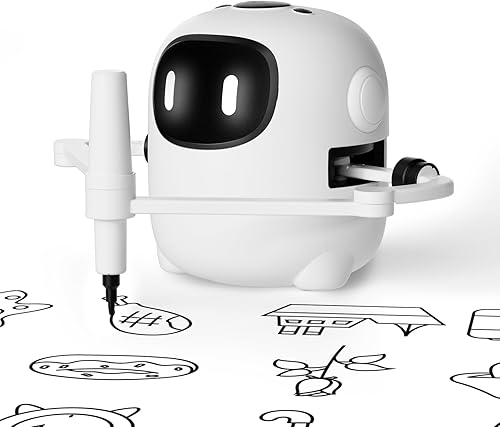 | 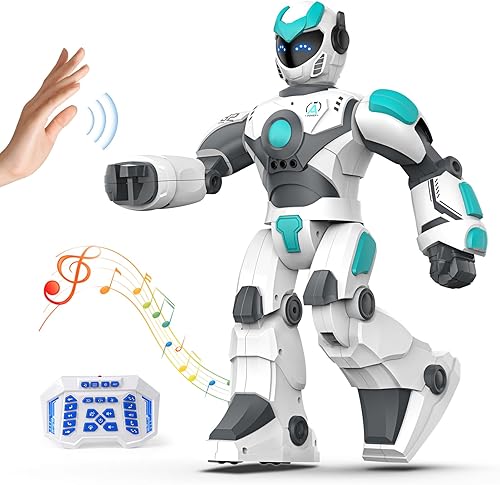 | 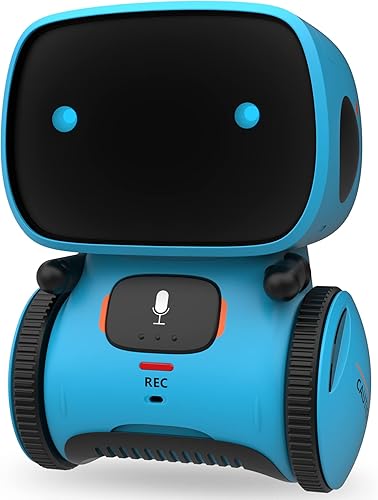 |  |
|---|---|---|---|---|---|---|---|---|---|---|
| Product | Wonder Workshop Dash | Loona Robot Pet | Ruko 1088 Smart | Anki Vector 2.0 | Ruko 18011 Puppy | Learning Resources Botley | Drawing Robot | VATOS Remote Control | GILOBABY Smart Robot | Makeblock Codey Rocky |
| Brand | Wonder Workshop | Loona | Ruko | Digital Dream Labs | Ruko | Learning Resources | RIVGOT | VATOS | GILOBABY | Makeblock |
| Best for | Best for Coding Education | Runner-Up | Also Great | — | — | — | — | — | Best for Younger Children | — |
| The listing says | Designed for kids aged 6-11 Teaches sequencing, loops, and algorithms | Features automatic recharge 2.0 Recognizes faces, gestures, and voice | Stands 15.8 inches in height Features 10 expressions and 9 joints | Requires 2.4 GHz Wi-Fi network Integrates with ChatGPT subscription | Features 70 LED facial expressions Programmable with 50 custom moves | Screen-free coding for kids Teaches logic through obstacle courses | Features built-in music Includes 150 drawing cards | Controlled by remote or gestures Programmable with 22 functional instructions | Interactive companion for ages 3-5 Touch and voice command controls | Supports remote control and coding Panda-shaped with expressive emotions |
| More information | Check Price on Amazon | Check Price on Amazon | Check Price on Amazon | Check Price on Amazon | Check Price on Amazon | Check Price on Amazon | Check Price on Amazon | Check Price on Amazon | Check Price on Amazon | Check Price on Amazon |
1. Wonder Workshop Dash Robot
Best for: Families wanting a robust, long-term tool for learning computer science.
This robot is designed to grow with a child’s coding skills, moving from simple path-finding to complex variables. It requires no assembly, allowing kids to start experimenting immediately. The lack of a camera means parents don’t need to worry about privacy or home monitoring features, keeping the focus entirely on the educational software.
The device relies on five different apps to teach concepts like loops and algorithms. It’s built for active play, with a battery life of up to 5 hours. This robot isn’t for those looking for an autonomous pet-like companion, as its primary purpose is educational interaction through programmed challenges.
Good if:
- You want a device used in formal classroom settings.
- You prefer screen-based block coding for your child.
- You want a robot that supports multiple age ranges.
Skip it if:
- You want a robot that acts like an autonomous pet.
- You prefer a screen-free learning experience.
2. Loona Robot Pet Dog ChatGPT-4o Smart AI-Powered Companion Voice &
Best for: Someone who wants a high-tech, AI-driven companion that feels alive.
Loona uses advanced artificial intelligence to recognize faces and gestures, mimicking the behavior of a real puppy. Its integration with ChatGPT allows for real-time conversation, making it more of an interactive friend than a simple toy. The home monitoring feature adds a layer of utility for parents, though it requires a well-lit environment to function correctly. Keep the camera and ToF depth sensor clean to ensure the robot tracks you accurately.
Because it’s powered by complex software, it needs a stable connection to perform at its best. If you face Wi-Fi restrictions, use a mobile hotspot to maintain connectivity anywhere. It isn’t for parents who want a simple, offline toy, as the advanced AI features rely on the provided app and internet connectivity.
When managing the battery, place the charging dock in an open area with no obstructions. You can preset multiple recharge routes from different rooms to help Loona return home successfully. If the robot struggles to find the dock, ensure you have updated to the V28 software to utilize the improved auto-recharge 2.0. A full charge takes about 2.5 hours.
Good if:
- You want the most advanced AI interaction available.
- You need a device that can monitor your home.
- You enjoy gadgets that respond to voice and gesture.
Skip it if:
- You’re uncomfortable with AI-powered data processing.
- You want a device that works entirely without internet.
3. Ruko 1088 Smart Robot Toy
Best for: A child who wants a large, impressive robot for programmable play.
Standing 15.8 inches tall, this robot makes a significant visual impact. Its nine flexible joints allow for dynamic movement, while ten pre-programmed songs and ten facial expressions keep interaction lifelike. The Ruko 1088 Smart balances entertainment with basic programming, helping children build logic and coordination through play.
The device is built from skin-safe ABS material with smooth, burr-free edges, ensuring durability for younger users. If the robot shows no response, charge it for 30 minutes. Always use the original cable provided in the package, as USB-C to USB-C cables aren’t supported and will fail to charge the unit.
Good if:
- You want a large-scale robot for dramatic, interactive play.
- You value a mix of entertainment functions like storytelling and dance.
- You appreciate multiple control options, including a 2.4GHz remote, a mobile app, or gravity-sensor phone tilting.
Skip it if:
- You have limited space for a large toy.
- You rely exclusively on USB-C to USB-C charging setups.
- You need a compact, pocket-sized device for travel.
The robot offers 100 minutes of playtime on a full charge, providing ample time for exploration without frequent interruptions.
4. Anki Vector 2.0
Best for: Older children or teens who want a truly autonomous desktop companion.
Vector 2.0 is designed to operate independently, navigating its surroundings and reacting to the world without needing a remote control. Its expressive personality, shown through its animated eyes, makes it feel more like a roommate than a toy. The integration with ChatGPT provides a sophisticated level of interaction, though this requires an active subscription to function.
Because it operates autonomously, it needs to be set up on a 2.4 GHz Wi-Fi network. It isn’t for young children who might struggle with the initial technical setup or those who don’t wish to manage a subscription service.
Good if:
- You want a robot that acts with real independence.
- You appreciate high-quality personality animation.
- You want multilingual support for language learning.
Skip it if:
- You don’t want to manage an active subscription.
- You find complex Wi-Fi setup processes frustrating.
5. Ruko 18011 Smart Robot Dog
Best for: Younger kids who want a robotic pet without the mess of a real animal.
This robot puppy focuses on simple, fun interactions like walking, wagging its tail, and dancing. The 70 LED lights provide a wide range of facial expressions, helping children understand the robot’s “moods” during play. It’s a great introduction to the idea of a robotic pet, offering enough complexity to keep kids engaged but keeping the controls simple enough for younger users.
The puppy uses obstacle-avoidance sensors to navigate indoor spaces safely. It isn’t for those who want a sophisticated, AI-powered conversationalist, as its interactions are more focused on physical movement and pre-programmed tricks.
Good if:
- You want a pet-like experience that’s easy to manage.
- You want a robot that’s safe for smaller indoor spaces.
- You want a visual, LED-based way to see the robot’s mood.
Skip it if:
- You want a robot that can hold actual conversations.
- You prefer a robot that doesn’t require remote control batteries.
6. Learning Resources Botley the Coding Robot
Best for: Parents who want to teach coding without any screen time.
Botley is the premier choice for families who want to limit digital exposure. It uses a remote programmer to teach logic and sequencing, which helps young children understand the basics of programming without needing a tablet or phone. It’s a tactile experience, perfect for building obstacle courses and exploring physical space.
The kit comes with everything needed to start, including coding cards and tiles. You can program up to 80 steps, use loops, and create if/then logic. This hands-on approach builds confidence as children see their commands physically executed. If your child is 5 to 7, focus on simple sequencing. If they are 8 to 12, challenge them to build complex obstacle courses using the black-line paths.
Avoid this tool if you want your child to learn text-based languages like Python. It isn’t for older children ready to transition to screen-based coding environments. Stick to this kit if you prioritize physical, screen-free STEM engagement.
Good if:
- You want a completely screen-free STEM experience.
- You have children between 5 and 12 years old.
- You prefer a durable, all-in-one kit.
Skip it if:
- You want to learn advanced coding languages.
- You prefer app-based interaction.
7. Drawing Robot
Best for: Young children ages 3 to 8 who are developing fine motor skills and an interest in artistic expression.
This device functions as an interactive companion that guides children through step-by-step drawing instructions. By using the 150 provided cards, kids learn to illustrate animals and everyday objects independently. The robot incorporates Montessori principles to foster problem-solving and focus, rather than passive entertainment.
If you’re looking for a device to teach coding or complex robotics, this isn’t the right choice. The robot is strictly an artistic tool designed to build hand-eye coordination. You must provide a 5V/2A power adapter to charge the unit, as one isn’t included in the box.
Good if:
- You want to encourage your child’s artistic side through structured guidance.
- You prefer toys that follow Montessori educational principles to build concentration.
- You want a complete set that includes 12 markers, 5 pens, and a reusable board.
Skip it if:
- You want a versatile robot that performs functions like dancing or singing.
- You’re looking for a complex coding tool or a programmable machine.
- You don’t have a compatible 5V/2A power adapter for the Type-C cable.
8. VATOS Remote Control Robot
Best for: Someone who wants a large, feature-packed robot with simple voice commands.
This robot offers a mix of remote control, gesture sensing, and voice commands. At 15.4 inches, it’s a significant presence in the playroom. It’s designed to be a playmate that tells stories, dances, and sings, making it a great choice for kids who want an interactive companion that’s easy to control.
The robot is made from durable ABS plastic and metal, designed to withstand daily play. You can program up to 30 commands to create custom sequences, which helps children practice basic logic. Charge the unit for two hours to get 60 minutes of active play. It isn’t for those who need a device with advanced, deep-learning AI, as its voice commands are limited to specific, pre-defined instructions.
Good if:
- You want a robot that offers multiple ways to play.
- You prefer a large, sturdy design.
- You want a companion that can tell stories and jokes.
Skip it if:
- You want a robot with advanced, conversational AI.
- You prefer something compact and portable.
- You need a device that runs for several hours without a recharge.
9. GILOBABY Smart Robot
Best for: Younger children in the 3-5 age range who need a simple, responsive friend.
This smart robot is built specifically for toddlers and preschoolers. Its touch and voice controls are designed to be intuitive, helping the youngest users develop coordination and motor skills. It doesn’t require complex app setups, making it a “grab and go” toy for quick play sessions.
If your child struggles to follow complex instructions, start by demonstrating the simple voice commands. If the robot doesn’t respond, ensure the child speaks clearly to trigger the responsive dialogue. This builds verbal skills through repetition.
Safety is a focus, with BPA-free materials and smooth edges designed to withstand rough play. It isn’t for older children who will quickly outgrow its simple, repetitive functions. If you need advanced programmable features or complex robotics, this toy will be too limited for your needs.
Good if:
- You have a child under 5 years old.
- You want a toy that’s ready to play immediately.
- You value safety features like BPA-free materials.
Skip it if:
- You have a child older than 6 who wants more challenge.
- You want advanced programmable features.
10. Makeblock Codey Rocky Interactive Coding Robot
Best for: The aspiring engineer who wants to move from blocks to Python.
Codey Rocky acts as a bridge for children aged 6 to 12 ready to transition from Scratch block-based programming to advanced Python. While the panda design and expressive emotions like smiling or anger encourage emotional development, the core of the device is a serious educational platform. It integrates with building blocks, allowing kids to physically expand their designs beyond the base unit.
This robot is built with impact-resistant materials to survive the rigors of a STEM classroom. If you’re choosing between a standard toy and this robot, look at your goals. If you want a passive experience, this is too complex. If you want a tool that supports CSTA-aligned lessons and gamified challenges, this is the right choice.
Parents often mistake this for a simple remote-control toy. If you treat it as a passive plaything, you lose the value of the coding progression. Use the provided online challenges to ensure the child moves from beginner tasks to actual script writing.
Good if:
- You want a clear path from beginner to advanced coding.
- You want a robot that works with standard building blocks.
- You need a device built to withstand repeated, rigorous use.
Skip it if:
- You want a simple, passive toy.
- You aren’t interested in learning Python or advanced coding.
Where These Overlap
Many of these robots share common ground, particularly in their use of ABS plastic for safety and their reliance on 2.4 GHz frequencies for stable remote control. If you’re choosing between the VATOS Remote Control and the Ruko 1088 Smart, you’ll find they offer very similar play experiences. Both are large, programmable, and emphasize entertainment like dancing and singing. The choice between these two often comes down to personal taste in aesthetic or the specific set of pre-programmed functions listed.
Conversely, the Wonder Workshop Dash and Learning Resources Botley occupy a distinct space. While both are excellent for STEM, they’re fundamentally different because one relies on screens and the other rejects them entirely. If your goal is to build logic without digital distractions, choose the screen-free Botley. If you want to progress toward advanced languages like Python, the app-enabled Dash or Codey Rocky are better investments.
The Loona Robot Pet and Anki Vector 2.0 are also distinct from the others; they aren’t just toys, but autonomous companions. Choosing between these requires deciding if you want a tool to teach a specific skill, like coding, or an interactive personality that adds life to your home. If you prioritize home monitoring and pet-like behavior, Loona is the clear choice. If you want a conversational partner powered by ChatGPT, look to Vector.
Still Not Sure?
Do I want an educational tool or a companion?
If you want your child to learn specific skills like logic, sequencing, or Python, look at an educational tool. These robots, like the Wonder Workshop Dash or Makeblock Codey Rocky, provide structured challenges that keep kids focused on building expertise. If you prefer a toy that provides emotional engagement, like a pet, look for companions that react to your presence. A robot that acts like a friend is often more effective at keeping a child engaged for long periods. For an educational focus, choose the Wonder Workshop Dash.
How much effort do I want to put into setup?
Some robots are ready to play the moment they leave the box, while others require Wi-Fi pairing, app downloads, or firmware updates. If you want a “no-hassle” experience, look for toys like the GILOBABY Smart Robot, which is designed for immediate, simple interaction. However, if you’re looking for advanced features like AI-powered conversation or home monitoring, you must be prepared for a more involved setup process. For a truly autonomous, high-tech experience that’s worth the setup, look at the Anki Vector 2.0.
What is the age and interest of the child?
A robot that is perfect for a young child may be far too simple for an older student. Think about what your child is currently interested in. Do they like drawing, or are they obsessed with robots that dance? If they’re young and love art, the Drawing Robot is an excellent choice. If they’re older and interested in how things work, a programmable robot that evolves with them is a better long-term investment. For a younger child who loves creative, artistic play, look at the Drawing Robot.
Frequently Asked Questions
Is it safe to leave these robots around young children?
Most interactive robots are constructed from child-safe, BPA-free ABS plastic with smooth edges to prevent injury. Parents should always check manufacturer age recommendations, as some robots contain small parts or batteries that pose hazards.
Do I need a tablet or smartphone for these robots to work?
The requirement for a device depends on the specific robot model. While the Learning Resources Botley is designed for screen-free coding, many others like the Wonder Workshop Dash and Loona Robot Pet require apps for setup and functionality.
How long will the battery last during normal play?
Battery life varies significantly, with the Wonder Workshop Dash offering up to 5 hours of play compared to the Ruko 18011 Puppy’s 45 minutes. Factors like volume, motor movement, and AI processing speed will affect how quickly the battery drains.
Can these robots be used on carpeted floors?
Most robots are designed for indoor use on hard surfaces like wood or tile. Robots with smaller wheels or delicate sensors, such as the Loona Robot Pet, may struggle to move effectively on thick carpet.
Closing
The best interactive robot for kids isn’t the one with the most features, but the one that fits your child’s current curiosity and your family’s daily habits. If you prioritize a serious educational partner that teaches coding logic through apps like Blockly, the Wonder Workshop Dash is a top-tier choice. For those seeking a screen-free approach, Botley allows kids to build logic using remote programmers and obstacle courses.
If you prefer a lifelike companion that brings advanced AI and autonomous personality into your home, the Loona Robot Pet is the better fit. However, if you choose an AI-powered device, remember that clear pronunciation in quiet spaces is required for the best results.
Start by deciding if you want a tool for structured learning or a friend for the playroom. If the robot requires a specific charging route or a 2.4GHz Wi-Fi network, ensure your home environment can support those technical needs before you buy.


