Choosing the right STEM model kit depends on whether your child prefers learning the logic of code, the mechanics of an engine, or the joy of building. The Makeblock mBot Coding Robot is a popular starting point for coding, while the Playz V8 Engine Kit is ideal for mechanical exploration. Consider your child’s age and their interest in screen time versus hands-on assembly to find the best fit.
All 10 products side by side — scroll sideways to see every column.
| Top Pick | Best for Engineering | Also Great | Best for Stunts | |||||||
| Preview |  |  |  |  | 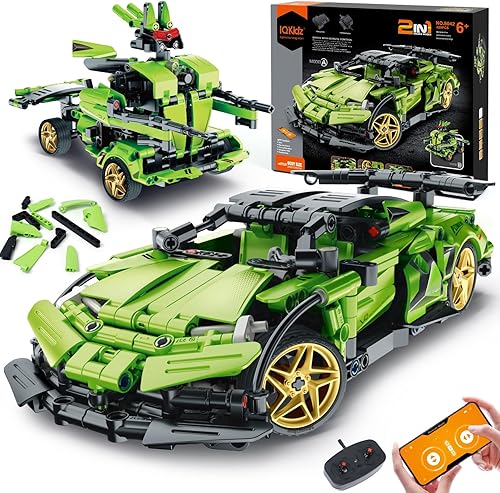 |  |  | 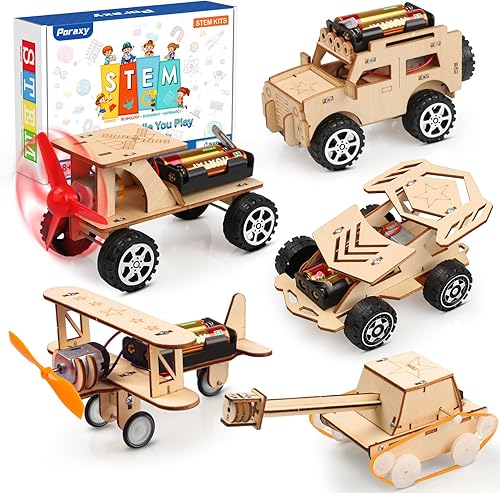 |  |  |
|---|---|---|---|---|---|---|---|---|---|---|
| Product | Makeblock mBot Coding Robot | ELEGOO UNO R3 Robot | Playz V8 Engine Kit | Sillbird 12-in-1 Robot | IQKidz RC Robot Car | Apitor 6-in-1 Robot | Robot Arm Building Kit | 5-in-1 STEM Car Kit | 3D Metal Engineering Kit | Wind Powered Car Kit |
| Brand | Makeblock | ELEGOO | Playz | Sillbird | IQKidz | Apitor | ANNISOKA | Poraxy | Jixin Xyzhi | BeAndge |
| Best for | Best Overall | Best for Engineering | Also Great | — | — | Best for Stunts | — | — | — | — |
| The listing says | Teaches electronics, robotics, and coding Assembles in 15 minutes | Programmable robot car kit Includes camera, line tracking, and sensors | Working 8-cylinder internal combustion engine model Features moving pistons and engine sounds | DIY solar-powered robot building kit Teaches engineering and renewable energy | 444-piece 2-in-1 car or robot kit Supports app and remote control | Build 6 models with 480 blocks Icon-based app for coding | Includes motors, PCB boards, and wires Teaches physics and engineering principles | Builds 5 different model cars Reinforces basic STEM knowledge | Designed for ages 8+ 194 precision-engineered metal components | Includes screwdriver and assembly instructions 5 wind-powered car kits |
| More information | Check Price on Amazon | Check Price on Amazon | Check Price on Amazon | Check Price on Amazon | Check Price on Amazon | Check Price on Amazon | Check Price on Amazon | Check Price on Amazon | Check Price on Amazon | Check Price on Amazon |
1. Makeblock mBot STEM Coding Toys Robotics
Best for: A young student starting their first journey into robotics and coding.
This kit helps kids transition from simple building to basic programming. It offers a clear path, allowing children to assemble the robot in about 15 minutes before transitioning to the software. Using the Makeblock apps, kids control the robot or play programming games to see how code affects real-world movement.
The kit includes features like line-following and obstacle avoidance, which provide immediate feedback when a child changes their code. If you’re choosing between kits, opt for this one if you prefer a metal frame. However, if your child prefers purely mechanical play, look elsewhere. The programming aspect is central to the experience, and it won’t function as intended without active engagement with the software.
Note that the robot requires four AA batteries and the remote controller requires a CR2025 battery. Neither is included in the box, so ensure you have these on hand before gifting to avoid immediate frustration.
Good if:
- You want a kit that’s compatible with LEGO parts.
- You need a robot that grows with the child via add-on packs.
- You prefer a metal frame over plastic for durability.
Skip it if:
- You want a toy that functions without any batteries.
- You don’t want to manage separate app installations.
- You’re looking for a project that doesn’t require a tablet or computer to unlock its full functionality.
2. ELEGOO UNO R3 Smart Robot Car Kit V4 with Camera
Best for: Teens or advanced kids interested in deep-dive engineering and camera control.
This is a sophisticated kit that brings together electronics and coding through a camera-equipped chassis. It’s designed for those who want to explore FPV (First Person View) video and complex obstacle avoidance. The keyed XH2.54 connectors help prevent wiring mistakes, making the assembly more accessible for beginners despite the advanced nature of the components.
The platform uses Arduino IDE, which is a step up from basic block-based coding, allowing for custom logic and experiments. If you want to move beyond simple movement, you can modify example code to create custom routes and reactions. This kit isn’t for a younger child who expects a “plug-and-play” toy, as it requires adult guidance for the initial setup and programming. It includes a 2000 mAh rechargeable battery, which is a major advantage for long-term use.
If you’re a first-time builder, follow the illustrated tutorial to progress from chassis assembly to the first successful run. Use the IR remote or the ELEGOO app if you prefer immediate control over the car’s interactive driving modes.
Good if:
- You want a robot that can stream live video.
- You’re comfortable with or want to learn Arduino programming.
- You prefer a rechargeable power source over disposable batteries.
Skip it if:
- You’re looking for a simple, snap-together building project.
- You have no interest in using a computer for setup.
3. Playz Large V8 Engine Model Kit Build Your Own Mini
Best for: Kids or adults who love mechanics and want to see how engines work.
This kit focuses entirely on mechanical engineering rather than electronics or coding. It provides a realistic experience where the builder connects pistons, cables, and fans to create a working replica of an 8-cylinder engine. It’s an excellent way to teach the principles of internal combustion in a visual, hands-on format.
The kit is challenging and requires patience, making it a great project for family bonding. Expect to spend hours tinkering with cranks, pulleys, belts, and exhaust valves to bring the model to life. If you find the engine fails to run, check the battery compartment first; the kit requires three AA batteries to power the motor fans and sound effects.
It isn’t for someone who is primarily interested in remote-controlled cars or mobile app connectivity. If you want a project that moves across the floor or responds to sensors, this kit will disappoint. Instead, choose this model if you want a stationary, desk-sized replica that demonstrates the internal movement of a classic combustion engine.
Good if:
- You want a screen-free, purely mechanical build.
- You enjoy building complex, detailed replicas.
- You want to learn about how car engines function internally.
Skip it if:
- You’re looking for a robot that moves across the floor.
- You prefer building with electronic sensors and code.
4. Sillbird 12-in-1 Solar Robot Building Kit STEM Gift
Best for: Outdoor play and learning about renewable energy sources.
This solar-powered kit allows children to build 12 different models, including robots and cars, from 190 parts. It’s designed to grow with the child, offering increasing levels of difficulty as they build more complex designs. It works best in direct sunlight but can also be powered by a strong artificial light source, such as a flashlight, to ensure play remains uninterrupted.
The kit is a great introduction to the concepts of solar energy and engineering. It isn’t for a child who wants to play primarily in dark rooms or who prefers high-speed, remote-controlled racing. The kit is best suited for children who enjoy the process of rebuilding and experimenting with different forms.
If your child struggles with assembly, start with the simplest models before moving to the advanced builds. This allows them to master the mechanics without frustration. If you notice the robot moving sluggishly, check the positioning of the solar panel; a direct angle toward the light source is required to harvest enough energy for full movement.
Good if:
- You want an eco-friendly kit that uses no batteries.
- You enjoy building many different models from one set.
- You want to encourage outdoor play.
Skip it if:
- You want a robot that can be controlled from a distance.
- You live in an area with very little natural sunlight and lack a strong artificial light source.
5. IQKidz STEM Building Blocks Kit
Best for: Children who want the speed and excitement of a remote-controlled race car.
This 2-in-1 kit offers the ability to build either a race car or a robot, providing two distinct play experiences. It includes 444 pieces and supports both remote control and app control, allowing for a mix of free driving and programmed routes. The pieces are designed to be sturdy, which is helpful for active play.
If your child is new to engineering, start with the race car configuration to master the basic mechanics before attempting the more complex robot build. The programming mode allows for setting specific driving directions, which is an excellent way to introduce basic logic. If the robot fails to follow a path, check the app connection first, as signal interference is a common cause of erratic movement.
The kit is a great middle-ground for kids who like construction sets but want a functional, fast-moving toy at the end. It isn’t for a child who is only interested in static models or pure coding. It requires disposable batteries, so you should keep a stock on hand to avoid mid-play interruptions.
Good if:
- You want a toy that can be driven like a real RC car.
- You enjoy a mix of building blocks and electronic control.
- You want a set that includes extra pieces for lost parts.
Skip it if:
- You’re looking for an advanced, Arduino-compatible robotics platform.
- You prefer a kit that uses rechargeable batteries.
6. Apitor STEM Coding Robot Toy 6-in-1 Building Kit
Best for: Kids who want a versatile, app-based coding experience with block building.
The Apitor kit uses 480 blocks to build six different models, all controllable via an app. It’s designed to teach coding concepts like loops and variables through a visual, icon-based interface. The robot can perform stunts and move in all directions, which keeps play engaging after the build is finished.
This kit is user-friendly for children aged 7-12 because it doesn’t require any tools or screws to assemble. You simply snap the pieces together. If you find the robot isn’t responding, check that you have installed three fresh AA batteries, as these are required but not included in the box.
Use the dual-motor or single-motor modes for basic navigation. If your child wants to experiment with advanced movement, switch to the gyro or path modes within the app. This allows them to map out specific routes or use tilt controls to steer.
It isn’t for a teenager looking for complex, professional-grade programming languages. If your child is ready to write lines of code rather than using icons, they will outgrow this system quickly. Stick to this kit while they’re still mastering logic and basic problem-solving.
Good if:
- You want to learn to code using an icon-based interface.
- You enjoy building multiple different robot configurations.
- You want a robot capable of 360-degree stunts.
Skip it if:
- You want to learn text-based coding languages.
- You prefer a kit that uses metal components.
7. Robot Arm Building Kit
Best for: A first-time builder who wants to understand circuits and mechanical movement.
This wooden kit functions as a 3D puzzle that allows builders to construct a working robotic arm. It teaches electrical engineering and physics as the user assembles the included motors, PCB microcontroller boards, and wires. Expect a complex build that rewards patience and rewards a sense of accomplishment once the mechanical hand is operational.
The kit is entirely hands-on and requires no soldering, making it accessible for builders aged 8 to 16 and beyond. If you’re working with children under 12, plan to provide supervision during the assembly of the delicate electronic components. You must supply 6 AA batteries, as they aren’t included in the box.
Good if:
- You enjoy working with wood and precision-cut parts.
- You want a project that focuses on mechanical lifting and grabbing.
- You want a challenging, non-digital building experience.
Skip it if:
- You’re looking for a mobile robot car or an app-controlled device.
- You want a kit that’s quick to assemble.
If the arm fails to move after assembly, check that every wire is firmly seated in the PCB board. A loose connection is the most common cause of a stalled motor. If the arm moves sluggishly, your batteries may lack the necessary charge to power the mechanical joints.
8. 5-in-1 STEM Car Kit
This set is a great value for those who want to build five different car models from a single kit. Made from laser-cut wood, the pieces fit together to create sturdy, functional designs. It’s specifically designed to be painted and decorated, which adds a creative, artistic element to the engineering process.
This kit is excellent for kids who like to make their toys unique. It’s a foundational set for teaching basic mechanics and hand-eye coordination through hands-on assembly. If your child prefers a single, complex build, they may find the variety of five smaller projects distracting. However, if they enjoy changing their focus frequently, this kit provides a fresh challenge with each model.
It isn’t for a child who is only interested in advanced electronics, complex coding, or high-speed remote control. This is a mechanical project focused on building and material customization. If you want a robot controlled by an app, look elsewhere.
Good if:
- You want to customize your models with paint.
- You want several different build options in one box.
- You prefer natural, laser-cut wooden materials.
Skip it if:
- You’re looking for advanced programming capabilities.
- You want a robot that’s controlled by an app.
- You prefer a single, long-term engineering project over multiple smaller builds.
9. Buildable 3D Metal Engineering Kit 194-Piece STEM Set
Best for: A builder who prefers the feel and durability of metal construction.
This 194-piece set is built for precision and long-lasting results. It allows for the creation of two unique mechanical designs, focusing on spatial reasoning and problem-solving. The metal components provide a different building experience than plastic sets.
The kit relies on step-by-step illustrated instructions to guide beginners through the assembly process. If your child struggles with fine motor tasks, the small, intricate nature of these metal parts may lead to frustration. Use the visual aids provided to ensure pieces are aligned correctly before tightening connections.
This kit is ideal for older children or teens who enjoy technical challenges. It isn’t for a young child who might find the small, intricate metal parts difficult to handle. It’s a great choice for those who want to experiment with their own mechanical designs.
Good if:
- You prefer the durability of metal over plastic.
- You want to develop spatial reasoning skills.
- You’re interested in designing custom mechanical structures.
Skip it if:
- You want a robot that includes motors or electronics.
- You need a kit that’s very easy for a beginner.
- You expect to build both designs at the same time.
10. Wind Powered Car Kit
Best for: A hands-on introduction to renewable energy and simple mechanics.
This set includes five individually packaged wind-powered car kits, making it perfect for group activities or parties. Each kit comes with the necessary tools and instructions to help children learn the basics of wind energy and engineering. It’s an excellent choice for a classroom setting or a family project.
The kit is simple and focuses on the core concept of converting wind energy into motion. It isn’t for a child looking for complex coding or advanced robotics. You must supply your own AA batteries to power the mechanical movement. If your child is between 8 and 12 years old, they have the manual skills to assemble these independently.
If you’re buying for a group, note that the individual packaging prevents parts from mixing between sets. This makes them ideal for after-school programs or science fairs. However, don’t expect a multi-day engineering challenge; these are designed for quick, successful assembly.
Good if:
- You need multiple kits for a group or school project.
- You want a simple introduction to wind power.
- You want a kit that includes all necessary tools.
Skip it if:
- You’re looking for a complex, multi-day building project.
- You want advanced electronic or app-controlled features.
Choosing STEM Robot and Car Model Kits for Kids
These kits share a common goal: teaching engineering through hands-on assembly. Kits like the Makeblock mBot and the Apitor 6-in-1 are close in function, as both use app-based coding to control a moving robot. If you choose between them, the decision comes down to the material—metal versus plastic blocks—and the coding interface you prefer.
The Sillbird and the STEM Car Kit offer multiple build options, but they differ in power. The Sillbird relies on solar energy or artificial light, while the 5-in-1 focuses on manual assembly and customization.
The ELEGOO UNO R3 stands apart with its camera and Arduino compatibility, making it the choice for users who have outgrown standard block-based coding.
When selecting, prioritize your primary goal. If you want a finished product that moves via remote control, look for kits with motors and app integration. If you want a model that demonstrates mechanical physics, choose the Playz V8 engine or the wooden robot arm. If you want a programmable platform, choose kits compatible with Arduino or Scratch.
A common mistake is ignoring battery requirements. Check if the kit needs AA batteries, as these are rarely included. Failing to account for this adds a trip to the store before the project can begin. If the kit says it requires a specific battery, such as a CR2025, ensure you have it on hand to avoid immediate disappointment.
Still Not Sure?
How much time do I want to spend on assembly?
Some kits, like the Makeblock mBot Coding Robot, are designed to be built in 15 minutes to allow for more focus on the software. Others, such as the Robot Arm Building Kit or the 3D Metal Engineering Kit, are projects that prioritize the complexity of the build itself. If you want a quick win, look toward the Makeblock mBot, while the Robot Arm Building Kit or the 194-piece metal set are better for projects requiring focus and patience.
What technology do I already have at home?
If your child has a tablet or a computer, they will get the most out of programmable kits like the Apitor 6-in-1 Robot. If your child prefers a screen-free environment, you should look at the Playz V8 Engine Kit or the versatile STEM Car Kit. Always check if you have the required batteries on hand. Many kits, including the Robot Arm Building Kit, require six AA batteries, while the mBot needs four, and neither includes them in the box.
What is the primary goal of the purchase?
Are you trying to teach coding, or are you trying to teach mechanics? For coding, the ELEGOO UNO R3 Robot provides the most advanced environment, including FPV camera control. If the goal is to understand how things work mechanically, the Playz V8 Engine Kit is the best choice. For a balance of both, the IQKidz RC Robot Car offers a way to combine building with remote-controlled movement.
If you choose a kit with many small parts, like the 689-piece robot or the 480-block Apitor set, ensure you have a dedicated workspace. Losing a single piece can halt the entire project. If the child is a beginner, prioritize kits with keyed connectors or illustrated guides, as these significantly reduce the frustration of incorrect wiring.
The right kit matches your child’s current curiosity. If they are fascinated by movement, the Playz V8 Engine Kit is a great start, while the Makeblock mBot Coding Robot is ideal for learning to control machines with code. Observe their preference for technical challenges or creative building, and check the instructions for necessary tools before starting.